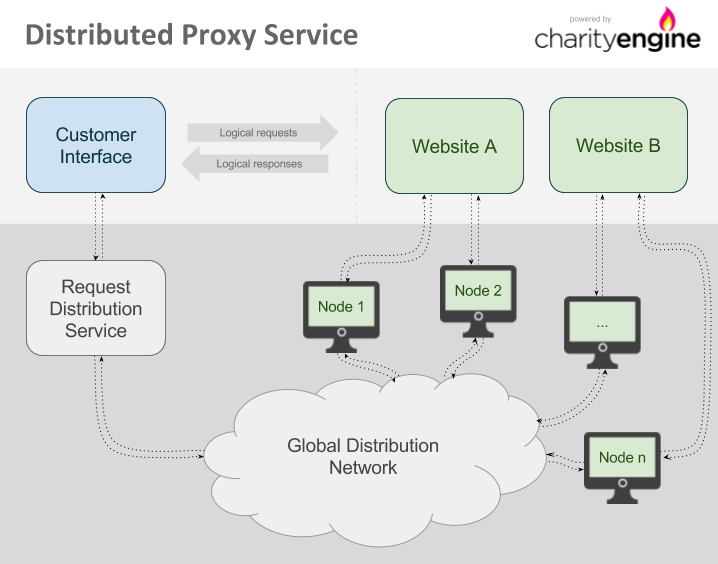
The Charity Engine Distributed Proxy uses the power and unique, geographically-dispersed nature of volunteer computing to allow web requests to originate from locations all around the world. Once a browser or other comparable web platform is configured to use the Distributed Proxy, any requests made from that interface to a target website will be routed by the request distribution service to ensure that origination is from the proper geographic location and that other options are applied.
Contents
Connecting to the proxy
The interface to this service is just like any standard HTTP proxy. Systems using this proxy should be configured to route web traffic through Charity Engine as detailed below and any request that goes out will be made by one of the computers in the Charity Engine network:
Host: charityengine.services
Port: 20000
Once requests are fulfilled by Charity Engine computers, the responses are returned as though the request was made directly.
It is possible and recommended to submit requests to the proxy in parallel. Even though a single request can take up to 20 seconds (and, in rare events, up to 40 seconds), there are enough nodes in the network to handle parallel loads. It is often a good practice to run up to 500 parallel requests.
IP addresses
If your network requires configuration using IP addresses to allow access to external services (such as a firewall or internal proxy configuration), the following is the full list of IP addresses that the Distributed Proxy service uses:
23.170.200.41
Though not common, the IP addresses in the list can be changed or become temporarily unavailable due to system maintenance. For this reason, the best approach will typically be to use the charityengine.services hostname to access the proxy service, unless your internal implementation will handle switching IPs to maintain connectivity.
Configuring requests
Each request sent through the Distributed Proxy should be configured according to requirements. Special HTTP headers are included in the request to authenticate with the proxy and also to ensure that the request is processed by a computer in the appropriate geographic location or even by one specific computer on the network.
Authorization
The Distributed Proxy uses standard proxy authorization. Each authorized request must contain a Proxy-Authorization header. Many of the tools that support HTTP proxies (such as CURL, wget, or web browsers) automatically generate the header (see section "Examples" for details). If the tools in use cannot generate the Proxy-Authorization header automatically, it should be generated manually.
Manual generation of the Proxy-Authorization header
To generate the header manually, encode your authenticator, a colon character (":"), and JSON-based configuration data (only if used - see section "Special use of the password field" for details) in base64. You can use tools like Base64Encode to do the encoding. Once encoded, add "Basic " as a prefix to the base64 encoded string. For example, if the username is "example" and JSON-based configuration is not used, the string to encode in base64 would be "example:" and the final header would be as follows:
Proxy-Authorization: Basic ZXhhbXBsZTo=
When a request is submitted without authorization, HTTP status code "407 Proxy authentication required " will be returned and the request will not be processed.
Special use of the password field
While the password field is unused and can be left blank, any JSON data that is passed in this field will be interpreted as request configuration; for example, using the following password will act as if X-Proxy-Country and X-Proxy-Timeout-Soft headers were configured and will only use nodes in Israel with a timeout of 10 seconds:
{"X-Proxy-Country":"IL","X-Proxy-Timeout-Soft": 10}
Geolocation
Distributed Proxy allows one to request proxy nodes in a specific geographic location.
All geolocation features may be subject to surcharges.
Use of these headers will limit the number of Charity Engine computers available to meet a given request; for best performance, they should only be used when specific geographic origination is required.
By country
When either of the X-Proxy-Country and X-Proxy-CountryExclude headers are included in the request, the proxy will perform geolocation and then include or exclude computers in the Charity Engine network based on the countries specified.
X-Proxy-Country will only use computers in the listed countries. For instance, to use only computers in the United States or United Kingdom, the following header should be specified (note that when designating multiple countries, country codes must be comma separated):
X-Proxy-Country: US,GB
To take the opposite approach, the X-Proxy-CountryExclude header is the reverse of X-Proxy-Country and will exclude any specified countries. For example, if a request can originate from anywhere except Argentina, the header would look like this:
X-Proxy-CountryExclude: AR
Country codes are defined in ISO 3166.
Geolocation headers are mutually exclusive. Send only one of X-Proxy-Country, X-Proxy-CountryExclude and X-Proxy-LatLon per request; if more than one is included, which one applies is not guaranteed.
By location (local targeting)
A more exact geographic location (such as a city) can be requested by using X-Proxy-LatLon header. It takes a list of requested latitude, longitude, and search radius in meters, all separated with semicolons. For example, to target 50km around New York, the header would look as follows:
X-Proxy-LatLon: 40.730610;-73.935242;50000
Values for latitude are positive for north and negative for south; values for longitude are positive for east and negative for west.
Geolocation headers are mutually exclusive; see the note under "By country" above.
Geolocation accuracy
Geolocation functions are not perfectly accurate: ie, a portion of nodes accessed via these features will not be in the designated regions.
As a rule, the error rate increases with the specificity of the targeting. For instance, geolocation using X-Proxy-Country will be more accurate than geolocation via X-Proxy-LatLon. And X-Proxy-LatLon with radius set to 50000 will be more accurate than X-Proxy-LatLon with radius set to 25000.
Additionally, geolocation accuracy may differ in various parts of the world, and is capped to a minimum of 25000 meters (25km, 15.5 miles).
By way of guidance, for country-level targeting, we estimate 99.8% accuracy. For LatLon targeting, at 50km radius, in the USA, we estimate 80-90% accuracy (*lower outside the USA)
Session persistence
When needed, it is possible for multiple requests to be served by the same computer on the Charity Engine network (e.g. for sessions to be maintained). This is accomplished by use of the X-Proxy-Session header in the request. We recommend using a V4 (random) UUID (the ID in this example is "b4b6ea85-b4bc-461f-bc14-63b7d37206e6"):
X-Proxy-Session: b4b6ea85-b4bc-461f-bc14-63b7d37206e6
Subsequent requests can then include the same header to ensure that they are handled by the same computer as the first request.
The session identifier will usually remain active for at least 10 minutes following the last request made using that identifier. If no additional requests are received in that time, the ID may expire and will no longer be useful. Note that even if the ID has not yet expired, it is still possible that the computer referenced by that ID will shut down or otherwise disconnect from the Charity Engine network. If this occurs, the request will return HTTP status code 503 Service unavailable.
If a 503 Service unavailable response is received while using the X-Proxy-Session header, in most cases a new request should be made with a new ID in the X-Proxy-Session header and that new ID should be used for subsequent requests.
Please note:
- Session IDs are not aliases for IP addresses; session IDs expire after a short period of time. The design assumption is that a session ID will be used to load all the elements of a single page, e.g. for a single transaction with multiple parts. (*Re-using a session ID for a series of pages will impair performance, as the pages will be read serially instead of in parallel.)
- Though unlikely, a single node may serve more than one session at a time.
Note: the legacy name for this feature was "Connection Groups". The older HTTP header, X-Proxy-ConnectionGroup, is currently deprecated but still supported.
Special considerations regarding HTTPS requests
Due to the nature of HTTPS proxying, the X-Proxy-Session header must be included either in the initial proxy CONNECT request, or in the password field as described in the "Special use of the password field" section of this document. Headers included in the HTTPS request itself may be ignored.
The method used to submit headers properly over HTTPS will depend on the software that is in use. For example, CURL requires the use of the --proxy-header parameter, e.g.: --proxy-header "X-Proxy-Session: b4b6ea85-b4bc-461f-bc14-63b7d37206e6"
See the "HTTPS requests" section for further details on how HTTPS proxying is handled.
Timeouts
The default behavior of the system is to run the request on a node and resend the request to another if the first one fails to respond within 20 seconds. If the second node also fails to respond, the request is expired (see section "Request expiration") after a total of 40 seconds.
It is possible to configure proxy timeouts for non-standard workloads such as crawling of pages that are slow to respond or generate large amounts of data. Specifying a "soft" timeout header X-Proxy-Timeout-Soft will change when work is reassigned to another host; specifying "hard" timeout header X-Proxy-Timeout-Hard will change when the request is expired.
The "soft" timeout is limited to a minimum of 5 seconds and a maximum of 120 seconds and defaults to 20 seconds; "hard" timeout is limited to a minimum of 10 seconds and a maximum of 120 seconds and defaults to 40 seconds. "Soft" timeout cannot be larger than "hard" timeout.
In the typical case where the "hard" timeout is larger than the "soft" timeout, more than 1 node can be dispatched to serve the same request; to prevent retries on a different node, set the "hard" limit equal to the "soft" limit.
Setting the soft timeout to the same value as the hard timeout will disable automatic request retries and may degrade your performance.
Restrictions of the system
Request expiration
Requests that cannot be resolved within 40 seconds will expire and return HTTP status code 503 Service unavailable. In order to distinguish 503 codes from the Distributed Proxy with 503 codes returned from the target of the request, 503 codes coming from the Distributed Proxy will also include an extra header:
X-Generated-By: CharityEngine
It is also possible to configure the expiration limits; see section "Timeouts".
HTTPS requests
HTTPS (SSL) requests are accepted using the HTTP CONNECT method where the initial request will open a tunnel and subsequent requests will load data. Most software will automatically handle this when the HTTPS protocol is specified for the request.
The SSL request will be decrypted at the proxy server and will be reissued as a separate request by the proxy node. Depending on the software you use, you may receive certificate warnings or information about a man-in-the-middle attack. You should disregard this warning as long as the certificate used in the response is for *.charityengine.com.
Special considerations for HSTS enabled sites
Sites that use HSTS (HTTP Strict Transport Security) tell browsers to refuse any certificate warning for them, so a certificate exception cannot be added. A browser stores this policy the first time it visits such a site directly, and keeps it for as long as the site specifies, often a year or more. Many popular sites, such as Google, are also on the HSTS preload list built into browsers, so this applies even if the site has never been visited.
The Distributed Proxy removes HSTS headers from responses, so visiting a site through the proxy does not store the policy. However:
- If an HSTS site has been visited without the Distributed Proxy, the browser will not allow a certificate exception for it until the stored policy expires or is cleared.
- For sites on the preload list, browsers never allow a certificate exception.
Non-browser tools (CURL, scripts, libraries) are usually not affected by HSTS and only need certificate verification disabled, as shown in the "Examples" section.
Error messages
Occasionally, the proxy cannot handle a request and an HTTP error code is returned along with one or more special HTTP headers. In order to be able to distinguish the error code from errors generated by remote servers, we will always include the header X-Generated-By: CharityEngine. There may be other HTTP headers that describe the problem. The following table lists all headers that may be encountered.
| HTTP status code | HTTP header | Description | Suggested action |
|---|---|---|---|
| 429 | The per-minute request limit set for your account on this site has been exceeded. Such limits apply only to specific sites where one has been set for your account; the count resets every minute. | Reduce the request rate for this site, or retry the request after the current minute ends. | |
| 503 | X-Proxy-Error: Host blacklisted by remote server | We have detected that the host that has been assigned to this session has been blacklisted by the remote server and this session will no longer return valid results for this hostname. Only applies if session feature is used. | Resubmit the request with a new session ID, or use a different hostname. |
| 503 | X-Proxy-Error: Host has reached daily request limit | The host that has been assigned to this session has executed the maximum number of requests to this hostname and this session will no longer return valid results for this hostname. Only applies if session feature is used. | Resubmit the request with a new session ID, or use a different hostname. |
| 503 | X-Proxy-Error: Host has reached transfer limit | The host that has been assigned to this session has transferred the maximum amount of data it is allowed and this session will no longer return valid results for any hostname. Only applies if session feature is used. | Resubmit the request with a new session ID. |
| 503 | X-Proxy-Error: Out of nodes | No node was available to take the request before the hard timeout, so it was never sent to the target site. Most often caused by narrow geolocation targeting, a session whose node is no longer connected, or very high concurrency. | Broaden or remove geolocation restrictions; if using X-Proxy-Session, retry with a new session ID; decrease the number of concurrent requests. |
| 503 | X-Proxy-Error: Timeout | The request was sent to one or more nodes, but none returned a response before the hard timeout. Usually the target site is slow to respond or returns a large amount of data. | Verify that the target site is responsive; for slow sites, increase X-Proxy-Timeout-Soft and X-Proxy-Timeout-Hard (see "Timeouts"). |
API
Blacklisting nodes
| API endpoint | https://work.charityengine.com/proxy/blacklistNode | |
|---|---|---|
| HTTP method | GET | |
| Parameters | hostname (string) | hostname to blacklist node on |
| nodeid (string) | value of the X-Proxy-NodeID header from a previous proxy response, URL-encoded | |
| Response | JSON/HTML | JSON message {"success":true} if successful, otherwise a HTML page explaining the error |
Blacklists a node for the specified hostname, preventing any crawls done on that hostname from the specified node for a period of at least 24 hours. Useful having detected an issue with the results returned by the host, e.g. invalid data.
Blacklisting usually takes effect within a minute of the API call.
Headless Browsers
The Charity Engine "Smart Proxy" service allows running of JavaScript applications within fully-featured web browsers on our network.
Dedicated Resource Pools
In general usage, requests made via Charity Engine's Proxy Service are distributed across the entire network (optionally limited to specific geolocations; see section "Geolocation"). In some cases, dedicated resources may be desirable. Such dedicated pools are available by special arrangement only.
Examples
CURL
Flag -k has to be used if using HTTPS.
Flag -v can be omitted, but is useful for debugging (gives back verbose request details).
Flag -A sets a user agent to the specified string (Google Chrome in the example below). Websites often block CURL user agents, so it is often beneficial to act as a browser.
curl -v -k -x charityengine.services:20000 -A "Mozilla/5.0 (Windows NT 10.0; Win64; x64) AppleWebKit/537.36 (KHTML, like Gecko) Chrome/64.0.3282.167 Safari/537.36" --proxy-user "authenticator:" "https://www.example.com"
Additional HTTP headers can be sent to use proxy service configuration options. For example, add --header "X-Proxy-Country: US" (including quotes) to only use nodes from the United States.
PHP
$url = 'https://www.example.com';
$authenticator = 'Your authenticator';
$ch = curl_init();
curl_setopt($ch, CURLOPT_RETURNTRANSFER, true);
curl_setopt($ch, CURLOPT_URL, $url);
curl_setopt($ch, CURLOPT_SSL_VERIFYHOST, false); // Only needed if using HTTPS
curl_setopt($ch, CURLOPT_SSL_VERIFYPEER, false); // Only needed if using HTTPS
curl_setopt($ch, CURLOPT_PROXY, 'charityengine.services:20000');
curl_setopt($ch, CURLOPT_PROXYUSERPWD, $authenticator.':');
$result = curl_exec($ch);
$curl_info = curl_getinfo($ch);
print_r($curl_info);
print_r($result);
Python
import requests
proxies = {
  'http': 'http://AUTHENTICATOR:@charityengine.services:20000',
  'https': 'http://AUTHENTICATOR:@charityengine.services:20000'
}
r = requests.get('https://www.example.com', proxies=proxies, verify=False)
print(r.text)
Both entries use http:// because the connection to the proxy itself is plain HTTP; HTTPS targets are tunnelled through it with CONNECT. verify=False is needed for HTTPS targets (see "HTTPS requests").
JAVA (java.net.http, Java 11+)
import java.net.*;
import java.net.http.*;
import java.security.cert.X509Certificate;
import javax.net.ssl.*;

public class ProxyExample {
  public static void main(String[] args) throws Exception {
    // Allow Basic proxy authentication for HTTPS tunnels (disabled by default since Java 8u111)
    System.setProperty("jdk.http.auth.tunneling.disabledSchemes", "");
    // Only needed if using HTTPS: accept the proxy's *.charityengine.com certificate
   System.setProperty("jdk.internal.httpclient.disableHostnameVerification", "true");
    TrustManager[] trustAll = { new X509TrustManager() {
      public void checkClientTrusted(X509Certificate[] c, String a) {}
      public void checkServerTrusted(X509Certificate[] c, String a) {}
      public X509Certificate[] getAcceptedIssuers() { return new X509Certificate[0]; }
    } };
    SSLContext ssl = SSLContext.getInstance("TLS");
    ssl.init(null, trustAll, null);

    String authenticator = "Your authenticator";
    HttpClient client = HttpClient.newBuilder()
      .proxy(ProxySelector.of(new InetSocketAddress("charityengine.services", 20000)))
      .authenticator(new Authenticator() {
        protected PasswordAuthentication getPasswordAuthentication() {
          return new PasswordAuthentication(authenticator, new char[0]);
        }
      })
      .sslContext(ssl)
      .build();

    HttpRequest request = HttpRequest.newBuilder(URI.create("https://www.example.com/")).build();
    HttpResponse<String> response = client.send(request, HttpResponse.BodyHandlers.ofString());
    System.out.println(response.statusCode());
    System.out.println(response.body());
  }
}
The two system properties must be set before the first request is made; alternatively pass them on the command line as -Djdk.http.auth.tunneling.disabledSchemes= -Djdk.internal.httpclient.disableHostnameVerification=true.
Node.JS
// Node.js 18+; npm install undici
const { fetch, ProxyAgent } = require('undici');

const authenticator = 'Your authenticator';
const dispatcher = new ProxyAgent({
  uri: 'http://charityengine.services:20000',
  token: 'Basic ' + Buffer.from(authenticator + ':').toString('base64'),
  requestTls: { rejectUnauthorized: false }, // Ignore certificate errors for HTTPS
});

(async () => {
  const response = await fetch('https://www.example.com/', {
    dispatcher,
    redirect: 'manual',
    headers: {
      'user-agent': 'Mozilla/5.0 (Windows NT 10.0; Win64; x64) AppleWebKit/537.36 (KHTML, like Gecko) Chrome/141.0.0.0 Safari/537.36',
      // Add additional headers if needed
    },
  });
  console.log('Done with request; status code ' + response.status);
  console.log(await response.text());
})();
To use options such as X-Proxy-Session with HTTPS targets, put them in the password field as JSON (see "Special use of the password field"), e.g. Buffer.from(authenticator + ':' + JSON.stringify({'X-Proxy-Session': sessionId})).
Account Dashboard
Activity and billing data for proxy service (and for computing and storage services) can be viewed via the account dashboard, accessible at https://accounting.charityengine.com/ (Reports may also be exported as .csv files.)
The amount of data transfer that is billed is equivalent to the size in bytes of the response body that is received from the remote system. If compression is used by the remote system, billing is based on the compressed size, not the size of the data when unpacked.
Please note: Data is reported in binary units (MiB, GiB, and TiB - i.e. multiples of 1024) rather than decimal (MB, GB, and TB - i.e. multiples of 1000). For more information, see Units of measurement for storage data.
Additional billing elements:
- Tasks - Proxy requests are reported in the dashboard as "tasks"
- Data surcharge for small requests - minimum charge per proxy request task (any request with a response smaller than the minimum size of 15 KiB carries a "small request" surcharge to bring it up to the minimum)
- Geolocation - use of geotargeted nodes (see section "Geolocation") may incur additional charges, on a per-request basis. Contact us for details.
- Domain surcharge - some domains incur additional charges, on a per-request basis. Contact us for details.
- The runtime and cost per hour of tasks are used for billing compute and storage services and are not relevant for proxy services.
Future enhancements
New features will be added to the Distributed Proxy system as they are developed and tested. If a specific capability is desired in order to use the Distributed Proxy for a given task, a new feature can be requested (these will be reviewed and implemented on a case by case basis).